Email Hacked? What to Do in the First Hour (Microsoft 365)
By Jazzy Khaneja, Founder
If a work email account in Microsoft 365 has been hacked, act in this order: reset the password and sign the account out everywhere, remove any sign-in methods or apps the attacker added, delete their inbox and forwarding rules, then warn your contacts and report it. A password change on its own leaves the attacker's rules and other changes in place.
In short
- Reset the password and use "Sign out of all sessions". Existing sessions can carry on for up to an hour.
- Check for inbox rules, forwarding, extra MFA methods and unfamiliar apps. These keep working after a password change.
- Warn contacts and suppliers that any payment or bank-detail request from that account is fake.
- Report it to Report Fraud (England, Wales and Northern Ireland) or Police Scotland on 101. Tell the ICO within 72 hours if personal data is at risk.
- Check the sign-in logs early. Without Business Premium they only go back 7 days.
Need a hand right now? You don't have to be a client. We can secure a hacked Microsoft 365 account and check what was accessed, at £125 an hour. Call 01276 942069 between 9am and 5pm, Monday to Friday.
What are the signs your business email has been hacked?
Microsoft lists these as common signs of a compromised Microsoft 365 mailbox:
- Contacts reply to emails you never sent, often about payments or a shared document
- Messages in Sent Items or Deleted Items that you don't recognise
- Inbox rules you didn't create, especially ones that forward mail to an outside address or move it to Junk Email, RSS Subscriptions or Notes
- Forwarding to an outside address turned on in the mailbox settings
- The mailbox is suddenly blocked from sending email (Microsoft does this when an account starts sending spam)
- Unexplained password changes, lockouts or a changed email signature
If you see any of these, treat the account as hacked until you've checked. Every hour you wait gives the attacker more time to read mail and message your contacts.
Email hacked: what to do in the first hour
You need a Microsoft 365 admin account for most of these steps. If the hacked account is your only admin account, sign in from a different device, or get help straight away.
| Step | What to do | Where in Microsoft 365 |
|---|---|---|
| 1 | Reset the password. Use a new, unique password and don't send it to the user by email, because the attacker may still be reading it. | Microsoft 365 admin centre > Users > Active users > select the user > Reset password |
| 2 | Sign the account out everywhere. | Same user > Account tab > Sign out of all sessions |
| 3 | Remove sign-in methods you don't recognise, such as an extra phone number or authenticator app. | Microsoft Entra admin centre > Users > select the user > Authentication methods |
| 4 | Remove apps the user doesn't recognise that have been given access to their mailbox or files. | Microsoft Entra admin centre > Users > select the user > Applications |
| 5 | Delete inbox rules and forwarding you didn't set up. | Outlook on the web > Settings > Email > Rules, and Settings > Email > Forwarding. Some accounts show Mail instead of Email. |
| 6 | If it was an admin account, check its admin roles and remove any that were added. | Microsoft 365 admin centre > Roles |
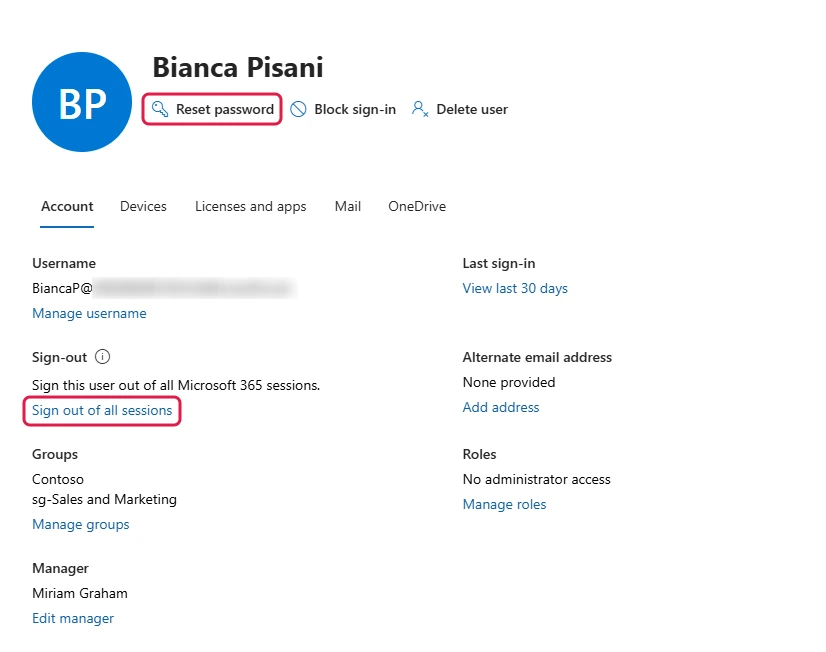 Steps 1 and 2. Reset password and Sign out of all sessions, outlined in red, are both on the user's Account tab in the Microsoft 365 admin centre.
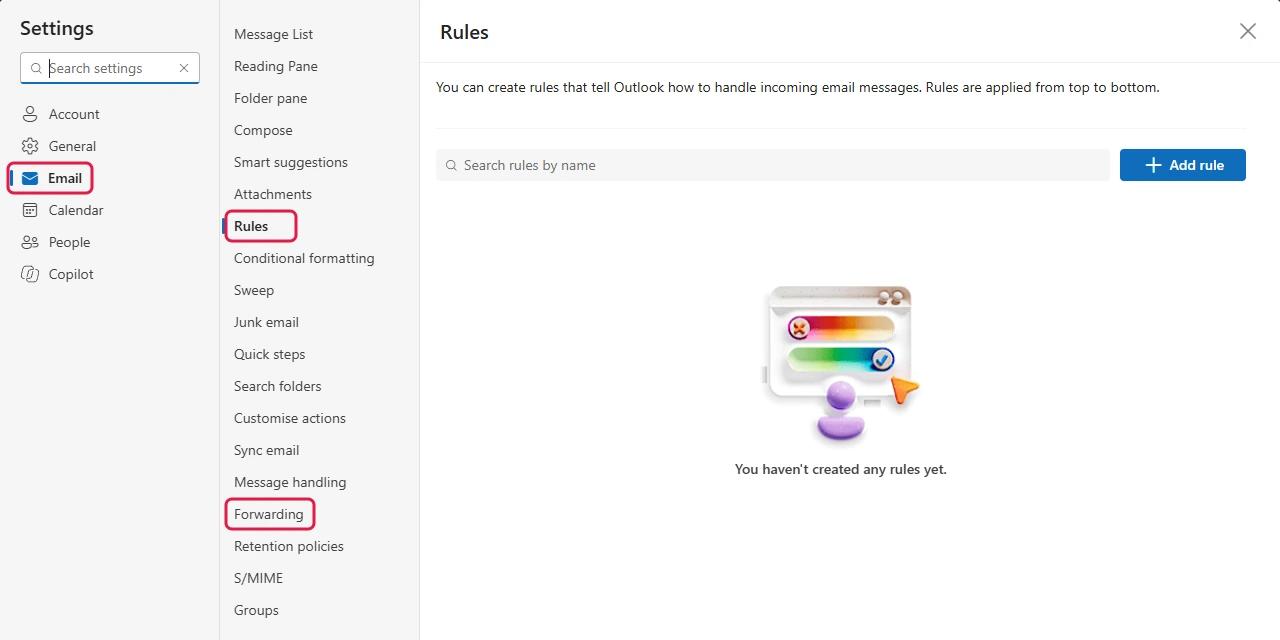 Step 5. In Outlook on the web, open Settings, then Email. Rules and Forwarding are in the same menu. This demo mailbox has no rules. Delete any the user didn't create.
Microsoft's own advice goes one step further: if you can, block the account from signing in while you investigate, then reset the password and switch it back on when you've finished.
Will changing the password stop them?
Not completely. A new password stops the attacker signing in again with the old one, but three things can survive it:
- Open sessions. Someone already signed in can stay in for a while. Microsoft says a user is asked to sign in again "within an hour" after Sign out of all sessions, depending on how long their access token has left. Whoever manages your IT can sign them out immediately with PowerShell.
- Rules and forwarding. Inbox rules and forwarding run on Microsoft's servers. They keep copying or hiding mail whether or not the attacker can still sign in. Attackers sometimes create rules that don't show in Outlook, and an admin can list those with PowerShell.
- App passwords and app access. App passwords aren't revoked when you reset the password, and an app the user approved keeps its access until someone removes it.
Who do you need to tell?
- Your contacts and suppliers. Tell anyone who has had emails from the account recently that messages sent during the attack may be fake. Be clear that you'll never change bank details by email, and that any request like that should be checked by phone on a number they already have.
- Report Fraud, if you've lost money or been the victim of a cyber crime. It replaced Action Fraud in December 2025. Report online at reportfraud.police.uk or call 0300 123 2040. In Scotland, call Police Scotland on 101. If money has left your account, call your bank first.
- The ICO, if personal data was exposed. You must report a personal data breach to the ICO within 72 hours of becoming aware of it, unless it's unlikely to put people at risk. A mailbox full of client or staff details usually counts. If you decide not to report, write down why.
- Your cyber insurer, if you have one. Check your policy wording for how quickly they need to know and who they want you to call first.
How do you work out what the attacker saw?
Start with the sign-in logs in the Microsoft Entra admin center (Users > Sign-in logs). Look at the IP addresses, locations and times around when things started going wrong. A sign-in from another country in the middle of the night is a strong clue.
How far back you can look depends on your licence. Microsoft 365 Business Premium includes Microsoft Entra ID P1, which keeps 30 days of sign-in logs. Business Standard and Business Basic keep 7 days. Upgrading afterwards doesn't bring back logs that have already gone, so check the logs on day one.
Then check what was sent. Look at the user's Sent Items for the same period, and use message trace in the Microsoft Defender portal to see what left the mailbox. The audit log in the Microsoft Purview portal shows what was opened, moved or deleted. Auditing is normally on by default, but check nobody has turned it off.
If you'd like help with this part, our cyber security service explains how we handle investigation and recovery.
How do you stop it happening again?
Many hacked Microsoft 365 accounts start with a stolen or guessed password. These settings make a stolen password far less useful:
- Multi-factor authentication (MFA) for every account, admin accounts included. Microsoft calls it essential for admin accounts.
- Block older sign-in methods that can't do MFA, so attackers can't go around it.
- Conditional Access rules that decide who can sign in, from where and on which devices. Our Conditional Access step-by-step guide walks through the basics.
- Keep automatic forwarding to outside addresses blocked. Microsoft 365 blocks it by default. Check nobody has switched that off.
- Advanced email security to catch the phishing emails that steal passwords in the first place.
If you're not sure which of these are switched on, our free Microsoft 365 security audit checks your sign-in, admin and email settings and tells you what's missing.
FAQ
Do I have to report a hacked business email account?
If personal data was exposed and that's likely to put people at risk, yes: you must tell the ICO within 72 hours of becoming aware of it. Reporting the crime to Report Fraud isn't a legal duty, but it's the official route and your bank or insurer may ask for the reference number.
Can the hacker still send emails as me?
Not once they're signed out and the password is changed, as long as nothing else gives them access. Check for extra MFA methods, app passwords and approved apps. Also check your domain's email security records (SPF, DKIM and DMARC), because without them anyone can send emails that look like they come from you.
How did they get into my email?
Usually through a phishing email that led to a fake Microsoft sign-in page, or a password reused from another site that was breached. The sign-in logs often show when and from where the first sign-in happened. Without MFA, a correct password is all an attacker needs.
Is MFA the same as 2FA?
Yes, near enough. Two-factor authentication (2FA) means two checks, usually your password plus a code or app approval on your phone. Multi-factor authentication (MFA) means two or more. The NCSC calls it 2-step verification. In Microsoft 365, the setting you want is MFA.
What if it's a personal Gmail or Outlook.com account?
The steps are similar, but you do them yourself in the account's settings: change the password, sign out of all devices, check forwarding and filters, and turn on 2-step verification. The NCSC's guide to recovering a hacked account covers personal accounts step by step.
Back in control? Check the rest of Microsoft 365
Once the account is safe, it's worth checking the settings that would have stopped the attack. The free Microsoft 365 security audit runs 76 checks across sign-ins, admin accounts and email. It's free for businesses with 5 or more staff.
Sources: 9 Microsoft, NCSC, ICO and police pages, last checked 5 November 2026
- Microsoft Learn, Respond to a compromised cloud email account: symptoms, disabling the account, revoking sessions, MFA methods, app consent, admin roles, forwarding and hidden inbox rules, app passwords not revoked by a reset. Accessed 5 November 2026.
- Microsoft Learn, Prevent user sign-in and block access to Microsoft 365: Reset password and Sign out of all sessions, the one-hour access token. Accessed 5 November 2026.
- Microsoft Learn, Revoke user access in Microsoft Entra ID: access and refresh tokens. Accessed 5 November 2026.
- Microsoft Learn, Microsoft Entra data retention: sign-in logs kept 7 days on Entra ID Free and 30 days on P1, upgrades not retroactive. Accessed 5 November 2026.
- Microsoft Learn, Control automatic external email forwarding. Accessed 5 November 2026.
- NCSC, Recovering a hacked account: steps for hacked accounts, 2-step verification, reporting to Report Fraud, Scotland on 101. Accessed 5 November 2026.
- Report Fraud, Report Fraud service goes live: Report Fraud replaced Action Fraud on 4 December 2025. Accessed 5 November 2026.
- ICO, Personal data breaches: a guide: reporting a personal data breach within 72 hours. Accessed 5 November 2026.
- ICO, 72 hours: how to respond to a personal data breach: steps for small organisations, including recording breaches you don't report. Accessed 5 November 2026.
Want this handled for you?
Circuit Minds is a UK managed IT provider - plans from £45 per user/month, with a free Microsoft 365 security audit to start. Cancel with 30 days notice anytime in your first 3 months, no questions asked.