Cyber Essentials checklist for small businesses
A printable checklist of 33 checks to work through before you apply for Cyber Essentials. It covers scope and the five technical controls (firewalls, secure configuration, security update management, user access control and malware protection), with where to find each setting in Microsoft 365 and which licence it needs. It follows the NCSC's requirements v3.3, the version in force from 27 April 2026. It is written for the owner or office manager of a small business and whoever looks after its IT.
Get the checklist- 33 checks in 7 sections, from scope to malware protection
- 6 work on any Microsoft 365 business plan, 11 need Business Premium and 16 are about your own rules, routines and equipment
- PDF, 6 pages, 630 KB, laid out for A4 printing
Written by Jazzy Khaneja, founder of Circuit Minds. Checked against the NCSC's Cyber Essentials requirements v3.3 and Microsoft's documentation on .
What's in the checklist?
The checklist has seven sections. These are the headings, with two checks from each.
Scope: what is in and what is out
5 checks
Firewalls
4 checks
Secure configuration
5 checks
Security update management
5 checks
User access control
8 checks
Malware protection
3 checks
Before you apply
3 checks
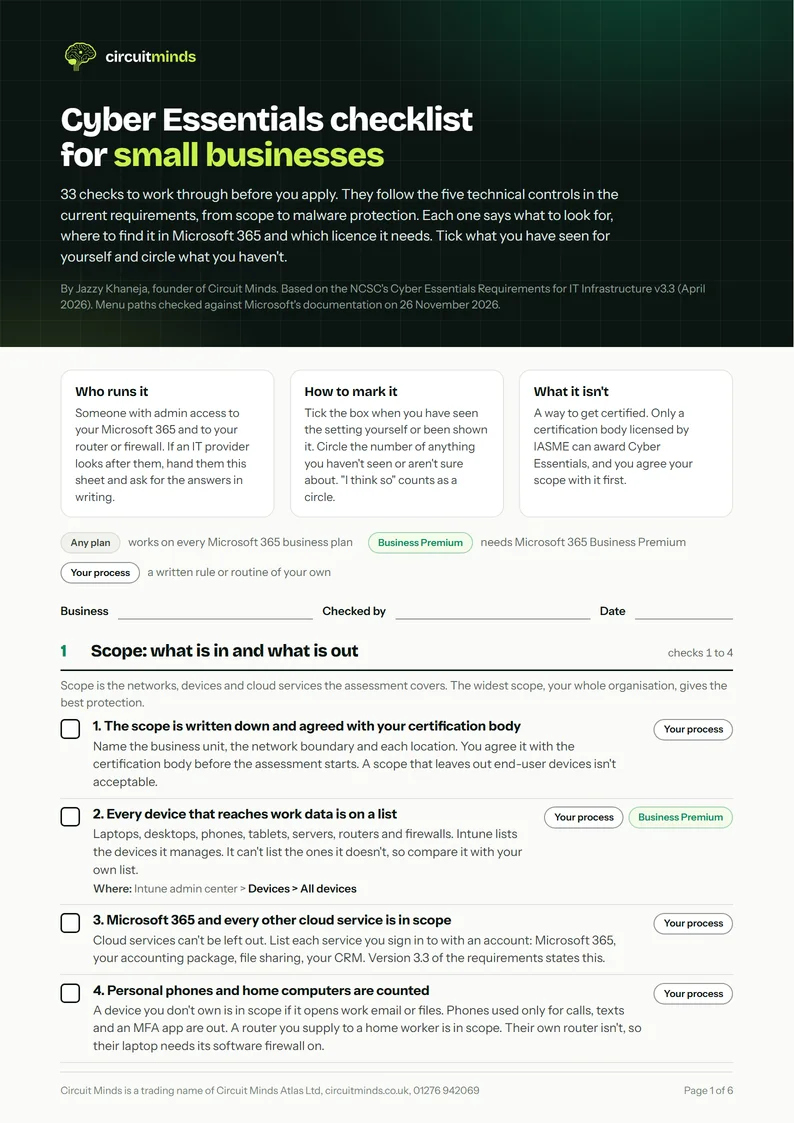
What does one check look like?
Each check is a statement you can tick, with a sentence or two on what to look for, where the setting is and which licence it needs. This is check 17 as it is printed:
Windows updates are managed and automatic
Update rings decide when updates install. Check one covers every Windows laptop.
Where (update rings): Intune admin center > Devices > Manage updates > Windows updates
Business PremiumThe last page lists what fails an application, who does what (we prepare you, a certification body certifies you) and how the First Step Fund works.
Questions about the checklist
Is the checklist enough to get certified?+
No. Only a certification body licensed by IASME can award Cyber Essentials, and it agrees your scope with you first. The checklist gets you ready to answer its questions accurately. Circuit Minds prepares businesses for Cyber Essentials. We are not a certification body.
Which version of the requirements does it follow?+
Cyber Essentials: Requirements for IT Infrastructure v3.3 (April 2026), which the NCSC lists as current from 27 April 2026. IASME's matching question set is called Danzell. It applies to assessment accounts created after 26 April 2026. Accounts opened before that date have six months to certify under the previous version.
Is there a Cyber Essentials Plus checklist?+
Cyber Essentials Plus covers the same five controls, so this list prepares you for both. A certification body tests the controls independently rather than only reviewing your answers. The checklist doesn't cover the Plus audit itself, and each certification body quotes its own price for it.
What are the most common reasons for failing?+
IASME says the most common reason is software that is no longer supported somewhere in the business. Under the April 2026 rules IASME also treats two things as automatic fails: no MFA on a cloud service where it is available, and critical or high-risk updates left uninstalled for more than 14 days. A scope that leaves out cloud services or end-user devices is not accepted either.
Do we need Microsoft 365 Business Premium?+
No. 6 of the 33 checks work on any Microsoft 365 business plan and 16 are about your own rules, routines and equipment. The other 11 use features that come with Business Premium, such as Intune and Defender for Business, and each is marked. If you want us to look at your setup, the free Microsoft 365 security audit runs 76 read-only checks and is free for businesses with 5 or more Microsoft 365 users.
Can the First Step Fund pay for it?+
The government's Cyber Essentials First Step Fund takes 75% off the certificate for eligible small and medium businesses applying for their first one, until March 2027 or until the money runs out. IASME runs the application at firststep.iasme.co.uk and sets the eligibility rules. The discount applies to the certificate only. See how Cyber Essentials preparation works.
Related
- Cyber Essentials preparationHow we get small businesses ready, what the certificate costs and how the fixed-price project works.
- Microsoft 365 security checklist for small businesses30 checks on how Microsoft 365 is set up, with the menu path for each.
- Free Microsoft 365 security audit76 read-only checks and a written report you keep.
Want to know how close you are? The free audit runs 76 checks.
Free for 5 or more Microsoft 365 users. You keep the written report.