Microsoft 365 security checklist for accountancy practices
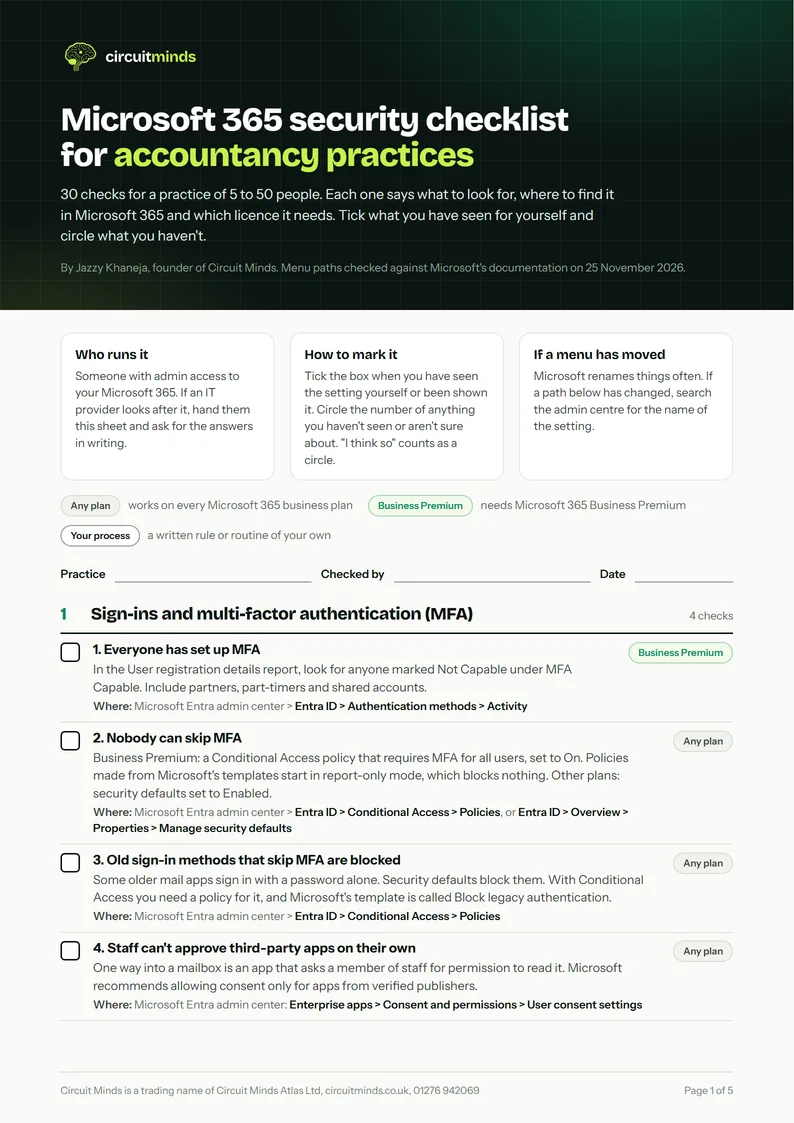
A printable checklist of 30 checks on how your practice's Microsoft 365 is set up. Each check says what to look for, where the setting is in Microsoft 365 and whether it needs Business Premium. It's written for the partner or practice manager at a practice of 5 to 50 people, to work through themselves or hand to whoever looks after their IT.
Get the checklist- 30 checks in 8 sections, from sign-ins to leavers
- 15 work on any Microsoft 365 business plan, 10 need Business Premium and 5 are about backup and your own routines
- PDF, 5 pages, 640 KB, laid out for A4 printing
Written by Jazzy Khaneja, founder of Circuit Minds. Menu paths checked against Microsoft's documentation on .
What's in the checklist?
The checklist has eight sections. These are the headings, with two checks from each.
Sign-ins and multi-factor authentication (MFA)
4 checks
Admin accounts
3 checks
Email and payment fraud
6 checks
Sharing client files
4 checks
Laptops and phones
6 checks
Backup
2 checks
Leavers
3 checks
Proof, for the day you're asked
2 checks
What does one check look like?
Each check is a statement you can tick, a sentence or two on what to look for, where the setting is and which licence it needs. This is check 29 as it is printed:
Microsoft 365 is recording who did what
The audit log shows what a stolen account opened. It isn't on by default for Business Basic, Standard or Premium. A banner asking you to start recording user and admin activity means it is off. Records are kept for 180 days.
Where: Microsoft Purview portal > Audit
Any planThe last page sets out what UK GDPR, the HMRC standard for agents, the Money Laundering Regulations 2017, ICAEW and AAT ask of a practice, with the source for each.
Questions about the checklist
Who is the checklist for?+
Partners and practice managers at accountancy and bookkeeping practices of roughly 5 to 50 people that run on Microsoft 365. You don't need to be technical to read it. To check the settings you need admin access to Microsoft 365, or an IT provider who will go through it with you.
Do we need Microsoft 365 Business Premium to use it?+
No. 15 of the 30 checks work on any Microsoft 365 business plan, and 5 are about backup and your own routines. The other 10 use features that come with Business Premium, such as Conditional Access, Intune and Defender for Business. Each of those is marked.
How is it different from your cyber security checklist for accountants?+
Our cyber security checklist for accountants is a blog post: ten things to check before January and why they matter. This is the working sheet. It has 30 checks, the menu path for each setting and the licence it needs, laid out to print and tick. If you run a business other than an accountancy practice, there is a general version for small businesses.
Does ticking every box make us compliant?+
No. UK GDPR asks for "appropriate technical and organisational measures", and none of the bodies that oversee accountants sets a technical checklist. The sheet is aligned with what the ICO, HMRC, ICAEW and AAT publish, and its last page quotes them. Compliance stays with your practice and your supervisory body.
How current are the menu paths?+
Every path was checked against Microsoft's own documentation on 25 November 2026. Microsoft renames menus often, so each check also names the setting. If a path has moved, search the admin centre for that name.
What's the difference between the checklist and the free audit?+
With the checklist, you look at the settings yourself. With the free Microsoft 365 security audit, we connect with read-only access, run 76 checks and send you a written report with the fixes in priority order. The audit is free for practices with 5 or more Microsoft 365 users.
Related
- IT support for accountantsHow we look after accountancy practices in Camberley and Surrey, with our prices.
- Cyber security for accountants: a checklist before JanuaryTen checks, how to tell a real HMRC email from a fake and how to protect your agent account.
- Free Microsoft 365 security audit76 read-only checks and a written report you keep.
Want this checked for you? The free audit runs 76 checks.
Free for 5 or more Microsoft 365 users. You keep the written report.