Switching IT provider: a 30-day plan
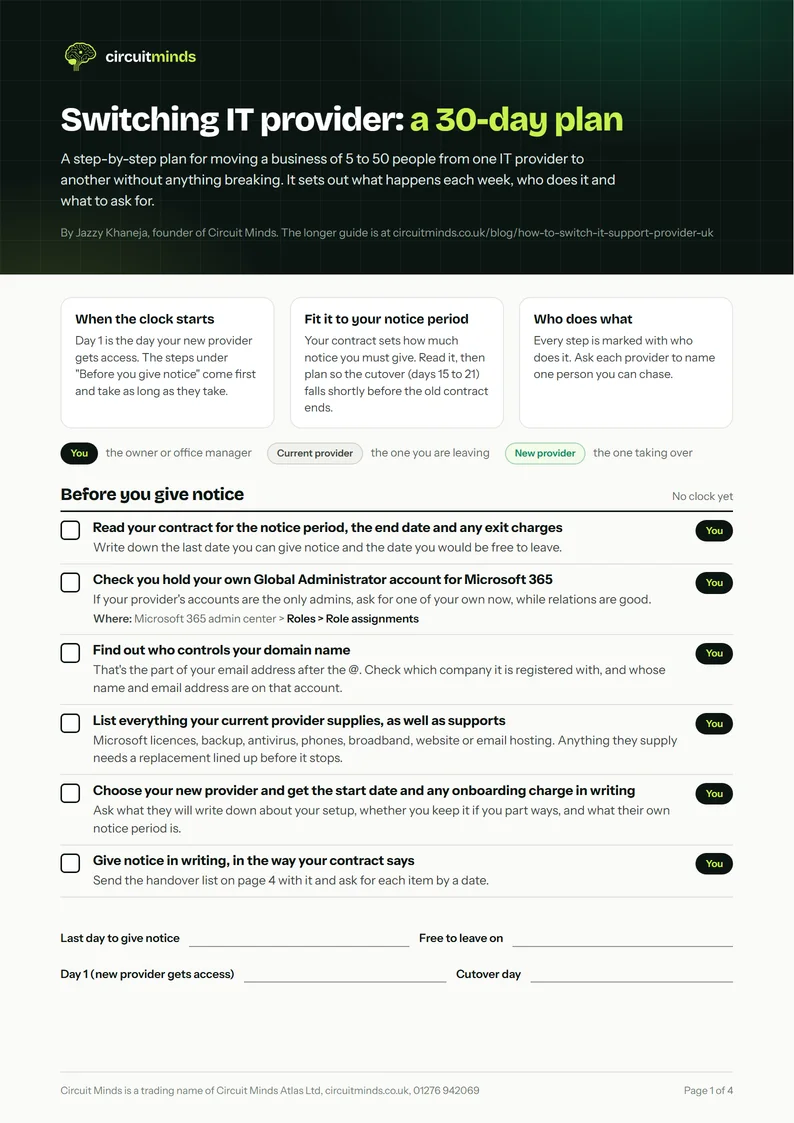
A printable plan for moving your business from one IT provider to another in about 30 days. It sets out what to do before you give notice, what happens each week, who does each step and what to ask your current provider for. It's written for the owner or office manager of a business with 5 to 50 people.
Get the 30-day plan- 28 steps in five stages, each marked You, Current provider or New provider
- A 10-item handover list to send with your notice
- 8 checks for what "done" looks like on day 30
- PDF, 4 pages, 635 KB, laid out for A4 printing
Written by Jazzy Khaneja, founder of Circuit Minds. Last updated .
What's in the 30-day plan?
The plan has five stages. Day 1 is the day your new provider gets access, and the first stage happens before that, in your own time. These are two steps from each.
Before you give notice
6 steps, no clock yet
Days 1 to 7: access and audit
6 steps
Days 8 to 14: quiet migration
5 steps
Days 15 to 21: cutover
6 steps
Days 22 to 30: checks and sign-off
5 steps
What should you ask your current provider for?
The plan has a handover list of ten things to ask for in writing, with a date against each. Five of them:
- A Global Administrator account for Microsoft 365 in your own name
- The sign-in for your domain name and its DNS settings, or a transfer to your own account
- A list of licences and subscriptions: what, how many, who is billed and when each renews
- Where your backups are kept, how far back they go and how to get at them
- Every password they hold for you: router, firewall, Wi-Fi, servers, printers, other portals
What does "done" look like?
The plan ends with eight things that should be true on day 30. Four of them:
- You hold a Global Administrator account for Microsoft 365 in your own name, protected by multi-factor authentication (MFA)
- Your domain name sits in an account your firm controls
- Every password the old provider knew has been changed
- One backup is running, and a restore from it has been tested
Every step is marked with who does it. You make the decisions, give notice and tell staff. Your current provider hands over and keeps answering support until cutover. Your new provider does the review, the new tools and backup, and the checks at the end.
Questions about the 30-day plan
How long does it take to switch IT provider?+
Usually two to four weeks from the day the new provider gets access. This plan allows 30 days, so the last week is left for checks. Your notice period may be longer than that. Read your contract and work back from the date you're free to leave.
Will our staff notice the switch?+
Not for the first two weeks. The new provider reviews your setup and installs their tools alongside the old ones. The one change staff see comes at cutover, when they get a new number and email address for help.
What should our current IT provider hand over?+
An admin account for Microsoft 365 in your own name, the sign-in for your domain name, lists of devices and licences, backup details, every password they hold for you and any notes on how your systems are set up. The plan has the full list of ten to send with your notice. What they must provide, and when, depends on your contract.
What if our current provider is slow to hand things over?+
Ask in writing, with a date, and keep the replies. Before you give notice, make sure you hold your own Microsoft 365 admin account and the sign-in for your domain name. Then your new provider can start their review while you wait. What your current provider is obliged to do comes from your contract.
Do you review our current IT contract?+
No. We don't review contracts or give legal advice. The plan tells you what to look for: the notice period, the end date and any exit charges. If a term is unclear, ask your provider in writing or take legal advice.
Do we have to switch to Circuit Minds to use the plan?+
No. It works with any two providers. If you'd like to know where your Microsoft 365 stands before you decide, the free security audit runs 76 checks and the report is yours whether you switch or not.
Related
- How to switch IT support providerThe longer guide: signs it's time to move, questions for a new provider and what switching costs.
- Free Microsoft 365 security audit76 read-only checks and a written report you keep, whether you switch or not.
- Plans and pricingOur published prices: £45 / £55 / £75 per user per month, ex VAT.
Not sure what you'd be handing over? The free audit runs 76 checks.
Free for 5 or more Microsoft 365 users. You keep the written report.