Cyber Security for Accountants: A Checklist Before January
By Jazzy Khaneja, Founder
Before the 31 January Self Assessment deadline, a small accountancy practice should check ten things: multi-factor authentication (MFA) on every account, separate admin accounts, safe client file sharing, tested backups, encrypted laptops, a rule for fake HMRC emails, a leaver process, up-to-date PCs, a breach plan and a short staff briefing.
In short
- January is busy, and busy people click. HMRC-themed emails, client uploads and rushed payments all peak around the deadline.
- Most of the ten checks are settings in Microsoft 365, and each takes minutes to check rather than days.
- HMRC publishes a list of the emails it really sends, and tells agents exactly how to keep their accounts safe. Use both.
- Never use a client's HMRC sign-in details. Use your own agent registration.
- Do the checks this month, while the diary still has room.
Why is January the riskiest month for an accountancy practice?
The online Self Assessment deadline is 11:59pm on 31 January 2027, and anyone paying their bill through their tax code must file by 11:59pm on 30 December 2026. Both dates come from the GOV.UK deadlines page. In the weeks before them, a practice handles more client documents, more email and more last-minute requests than at any other time.
That is the setting criminals like. A message that looks like it comes from HMRC, a client or a colleague gets less scrutiny when everyone is rushing. The NCSC says 1 in 2 small businesses suffer a cyber incident every year, and its advice is that cyber security is "everyone's business", not one person's job. A practice also holds exactly what attackers want: names, addresses, National Insurance numbers, bank details and tax records for many people.
What are the 10 checks to make before January?
Here is the checklist, with where to look in Microsoft 365 for each one. If you use a managed provider, they should be able to answer each line in minutes.
| # | Check | What to look for in Microsoft 365 |
|---|---|---|
| 1 | MFA on every account | Every user, including partners and part-timers, has MFA. No exceptions for "just the boss". |
| 2 | Separate admin accounts | The person who manages IT uses a different account for admin work, not their daily email login. |
| 3 | Safe sign-in rules | Conditional Access blocks older sign-in methods that skip MFA. See our guide to Conditional Access policies. |
| 4 | Client files by link, not attachment | Send documents through SharePoint or OneDrive links with expiry dates, so you can switch access off later. |
| 5 | Backups you have tested | A backup of Microsoft 365 data held away from Microsoft's own copy, and one restore actually tried this year. |
| 6 | Encrypted, managed laptops | Every laptop is encrypted and can be wiped remotely if it goes missing. |
| 7 | Updates applied | Windows and apps are up to date. Windows 10 PCs without paid extra support are a gap: see our Windows 10 options guide. |
| 8 | Fake HMRC email routine | Everyone knows where to check an HMRC email and where to forward a suspicious one (see below). |
| 9 | Leaver process | Accounts, files and devices are closed down on the last day. Our guide to stopping ex-employees accessing business files has the steps. |
| 10 | A breach plan on one page | Who to call first, who locks accounts, who decides whether to tell the ICO and clients. |
If you would like someone to go through this table with you, book a call.
How do I tell a real HMRC email from a fake?
HMRC keeps a page listing the emails it has recently sent, so you can compare the one you received. The page was last updated on 16 November 2026. Two points from HMRC's own guidance are worth putting on the office wall:
- HMRC will only ever email you about a tax rebate, or ask for personal or payment information, from an email address ending in hmrc.gov.uk.
- Texts from HMRC will never notify you of a tax rebate or ask you to give personal or payment details.
Seasonal emails are real too, which is why the list is useful. At the time of writing, for example, HMRC says it may send Self Assessment reminder emails to people who need to complete a tax return, reminding them to submit it and pay by the deadline. A fake can copy the style of a real one, so go to the list or to your own HMRC account rather than following a link.
To report one, forward the email to phishing@hmrc.gov.uk, then delete it. Suspicious texts go to 60599. Both routes are on HMRC's reporting page.
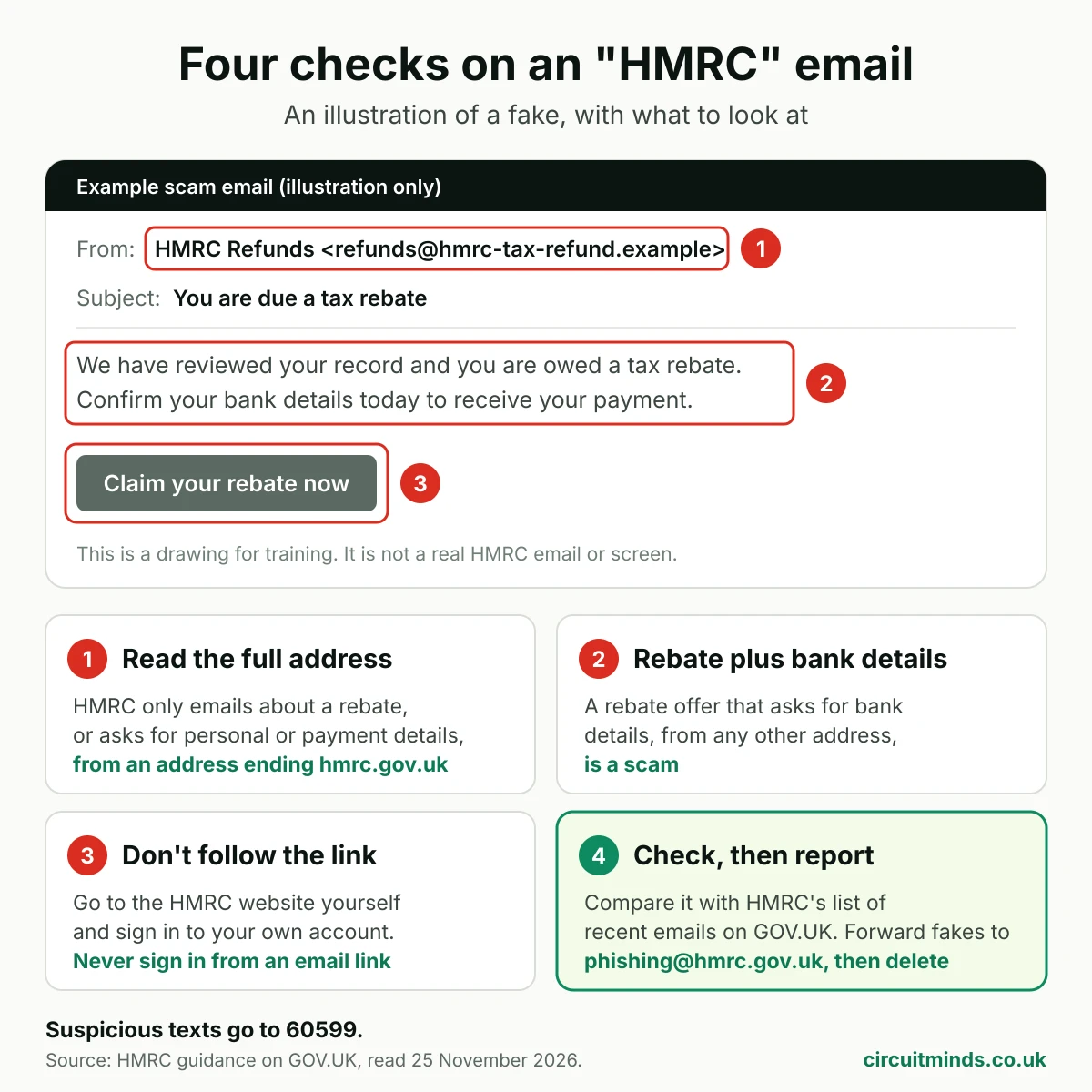 Four checks to run on any email that claims to be from HMRC. The email shown is a drawing, not a real HMRC message.
How should a practice protect its HMRC agent account?
HMRC has a page for agents on exactly this, last updated on 13 May 2026. The main points:
- Access client details through your own agent registration. Do not use a client's sign-in details.
- Keep your list of administrators and assistants up to date, and don't let anyone use your sign-in. If others need access, set them up as administrators or standard users.
- Sign in to HMRC services by going to the website yourself. Don't follow a link in an email.
- Check your HMRC account for odd activity, such as changed email addresses or added software.
- Personal computers used for work need the same security controls as office computers.
- Don't reuse old passwords. HMRC suggests combining three random words for a password that is unique and easy to remember.
If you see suspicious activity in an account, HMRC says not to attempt to correct anything yourself. Report it through the route on the GOV.UK page.
Is it safe to send tax documents by email?
Ordinary email is a poor place for tax returns and ID documents. Messages sit in several mailboxes for years, and a single hacked inbox exposes all of them. For client documents, use a file link with an expiry date and keep the files in one place you control. That way, if a client's mailbox is hacked later, your documents aren't sitting in it.
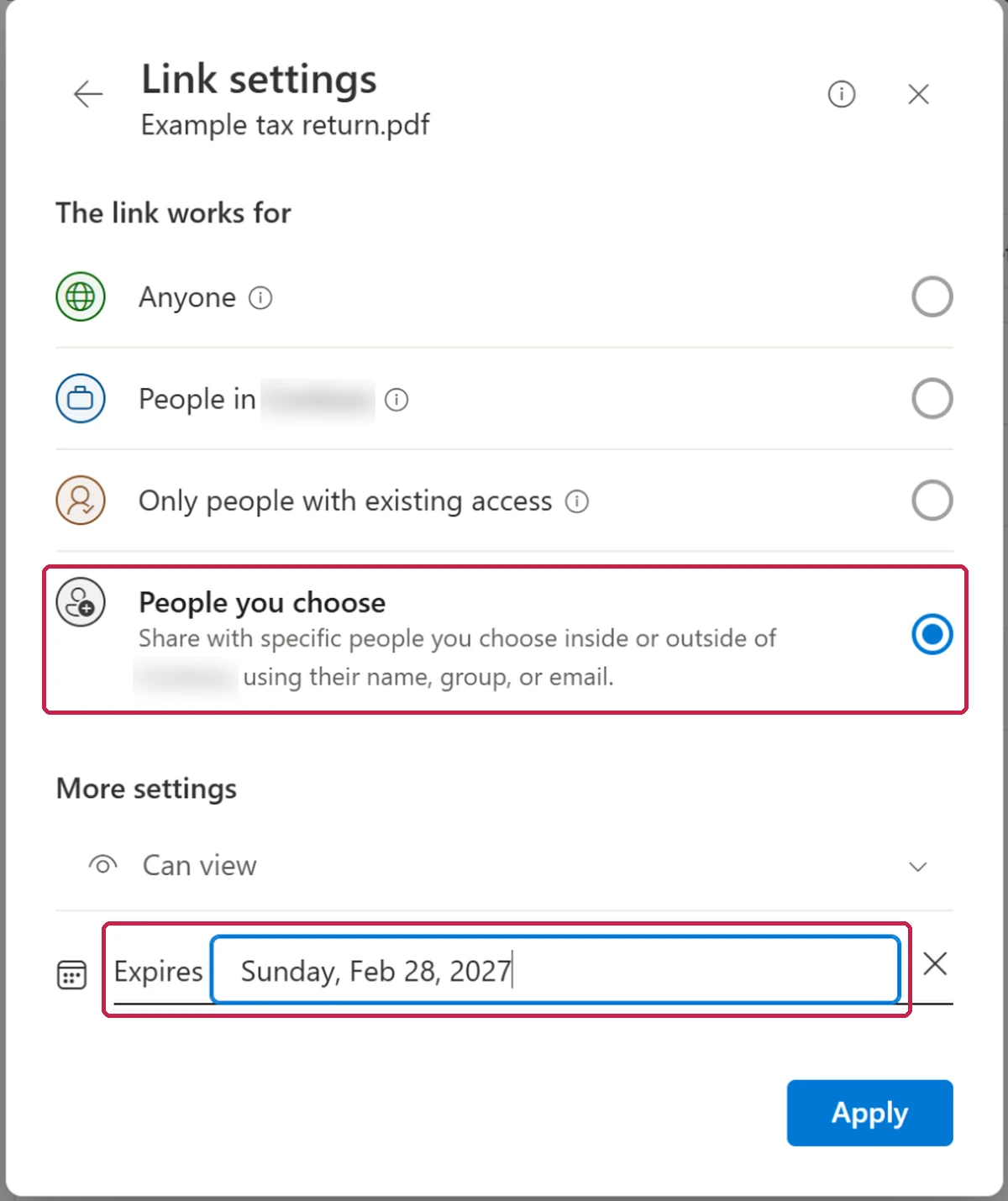 The link settings for a file in OneDrive. Open Share, then the link settings, choose People you choose and set an expiry date before you send the link.
When a client sends you something, ask them to upload it through your secure link rather than email it. Most clients are happy to follow a simple instruction from their accountant.
What should I ask my practice software vendor?
I can't tell you how your tax software is built, and I don't claim any special integration with any particular product. But you can ask each vendor the same plain questions:
- Does it support MFA for every user, and can I make it compulsory?
- Can I see who has access and remove them quickly when someone leaves?
- Where is the data stored, and how do I get a copy back if I need one?
- What do I do, and who do I call, if I think an account has been misused?
Write the answers down. They will help the day you fill in a cyber insurance questionnaire.
What if a client's data is breached?
Under UK GDPR, if a breach is likely to put people at risk you must tell the ICO within 72 hours of becoming aware of it. Seventy-two hours is not long, so the one-page plan in check 10 matters. It should say who locks accounts, who reviews what was accessed and who contacts affected clients.
Do accountants need Cyber Essentials?
It is not a legal requirement for accountants, but some clients, lenders and insurers ask for it. A managed IT provider can prepare you for it; the certificate itself comes from an approved certification body. A practice that has done the ten checks above is well on the way to being aligned with the five Cyber Essentials controls.
FAQ
What cyber security does an accountancy practice need?
At minimum: MFA on every account, safe client file sharing instead of email attachments, tested backups, encrypted and updated laptops, a leaver process and a staff routine for fake HMRC emails. The ten-point table above covers each one.
How do I know if an HMRC email is real?
Compare it with HMRC's published list of recent emails, and check the sender address. HMRC says it will only email you about a tax rebate, or ask for personal or payment information, from an address ending in hmrc.gov.uk. When in doubt, sign in to your HMRC account directly.
Where do I report a fake HMRC email?
Forward it to phishing@hmrc.gov.uk and then delete it. Suspicious texts go to 60599. If you notice odd activity inside an HMRC online account, there is a separate report route on GOV.UK.
Can I use a client's HMRC sign-in details?
No. HMRC tells agents to access client details through their own agent registration and not to use clients' sign-in details. Keep your list of administrators and assistants up to date too.
Is Microsoft 365 secure enough for client data?
It can be, once it is set up properly. Many of the useful protections (MFA, sign-in rules, file labels, device management) need switching on and checking. A review of your settings shows where yours stands.
We're a practice of three. Is this still for us?
Yes. A small practice holds the same sensitive records as a large one, and the NCSC's figures are for small organisations. The ten checks scale down well.
Next step
Start with the table and tick off what you can today. If you want help with the rest, see how we support IT for accountants, then book a call.
Sources: 6 GOV.UK and NCSC pages, checked 9 and 25 November 2026
- GOV.UK, Self Assessment tax returns: deadlines: 31 January 2027 online deadline and 30 December 2026 tax code deadline. Accessed 9 November 2026.
- GOV.UK (HMRC), HMRC: checking an email you have received (last updated 16 November 2026): list of recent HMRC emails, including Self Assessment reminders. Accessed 25 November 2026.
- GOV.UK (HMRC), Report suspicious HMRC emails, texts, social media accounts and phone calls (last updated 24 November 2025): reporting addresses and the hmrc.gov.uk rule. Accessed 25 November 2026.
- GOV.UK (HMRC), Keep your HMRC online security information safe as an agent (last updated 13 May 2026). Accessed 9 November 2026.
- GOV.UK (HMRC), HMRC phishing and scams: detailed information. Accessed 9 November 2026.
- NCSC, Small organisations guide to cyber security (published 9 April 2026, reviewed 21 July 2026): 1 in 2 small businesses suffer a cyber incident every year. Accessed 9 November 2026.
Want this handled for you?
Circuit Minds is a UK managed IT provider - plans from £45 per user/month, with a free Microsoft 365 security audit to start. Cancel with 30 days notice anytime in your first 3 months, no questions asked.