Windows 10 Extended Security Updates: Your Options Now
By Jazzy Khaneja, Founder
Windows 10 support ended on 14 October 2025. Businesses can still buy Extended Security Updates (ESU) for security fixes until 10 October 2028 at the latest, paid per device, per year. Joining now means paying for Years 1 and 2: about £174 a PC before VAT. Upgrade the PCs that can run Windows 11 and keep ESU for the rest.
In short
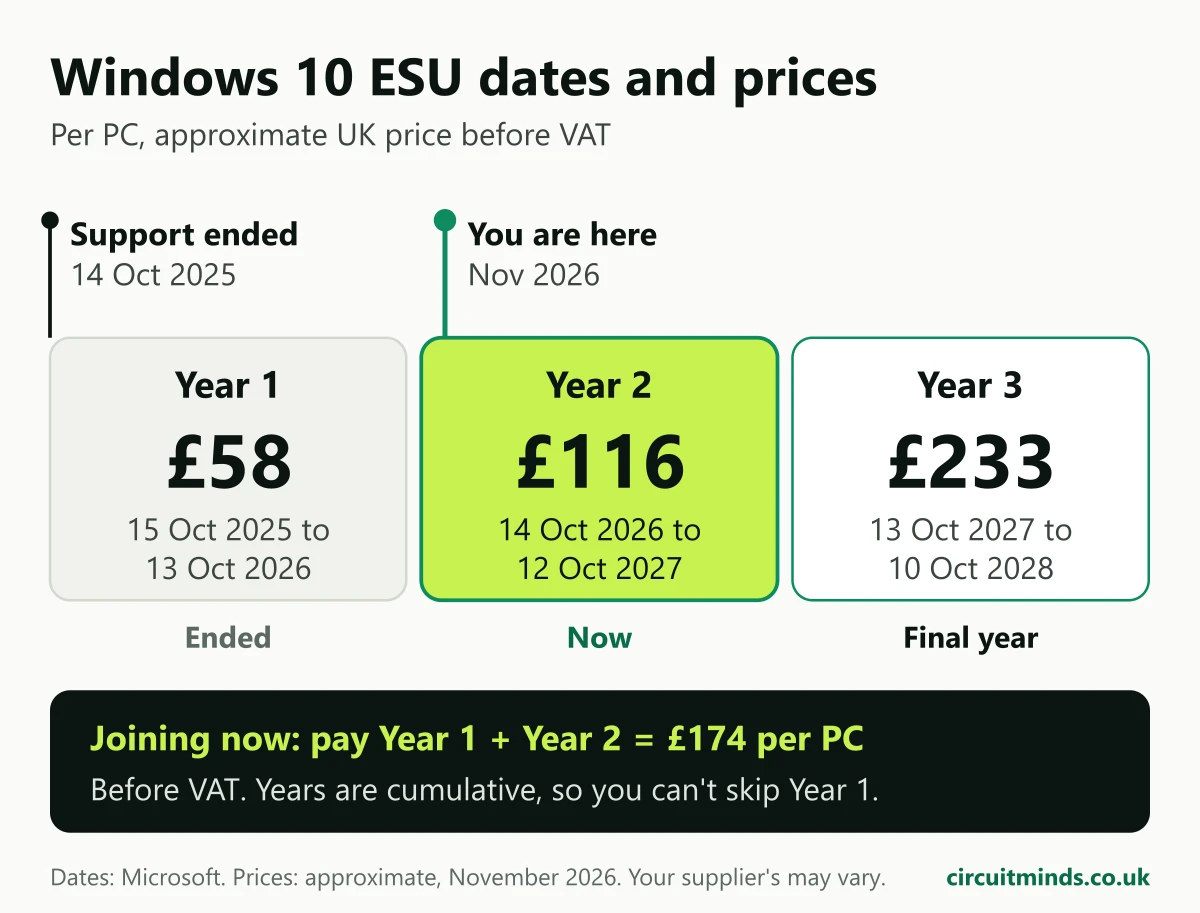
- ESU Year 1 ended on 13 October 2026. Year 2 runs to 12 October 2027, Year 3 to 10 October 2028. There is no Year 4.
- Approximate UK price: about £58 a PC for Year 1, doubling each year (before VAT). Years are cumulative, so you can't skip Year 1.
- Microsoft's consumer ESU can't be used on work PCs joined to Microsoft Entra or managed in Intune.
- Upgrading an eligible Windows 10 PC to Windows 11 costs nothing in licences. The work is checking which PCs qualify and planning the upgrade.
- Windows 365 Cloud PCs get ESU included, and so do Windows 10 PCs used to connect to them.
What are Windows 10 extended security updates?
ESU is a paid subscription that keeps sending critical and important security updates to Windows 10 PCs after support has ended. Microsoft calls it a "last resort" and "a temporary bridge" while you move to a supported system, not a long-term plan.
What ESU does include:
- Monthly security fixes rated critical or important by Microsoft
- Up to three years of cover for business PCs, bought one year at a time
What ESU doesn't include:
- New features or non-security fixes
- Technical support for Windows 10 itself (Microsoft only helps with activating and installing ESU)
The dates, from Microsoft's own tables:
| ESU year | Cover starts | Cover ends | Approx. UK price per PC (before VAT) | Microsoft US list price |
|---|---|---|---|---|
| Year 1 | 15 October 2025 | 13 October 2026 | £58 | US$61 |
| Year 2 | 14 October 2026 | 12 October 2027 | £116 | US$122 |
| Year 3 | 13 October 2027 | 10 October 2028 | £233 | US$244 |
Microsoft states the Year 1 price and that "the price doubles every consecutive year"; Years 2 and 3 are that doubling. Microsoft publishes prices in US dollars only. The UK prices are approximate, before VAT, as of November 2026; your supplier's price may differ slightly.
How much does Windows 10 ESU cost for a small business?
Because ESU is cumulative, a business joining today pays for Year 1 as well as Year 2. Microsoft says plainly: "If you decide to purchase the program in Year Two, you have to pay for Year One too."
At approximate UK prices, per Windows 10 PC, before VAT:
- Covered to 12 October 2027: £58 + £116 = £174
- Covered to 10 October 2028: add £233 = £407
There's no minimum: you can buy a single licence.
A worked example for a 10-PC office where 7 PCs can take Windows 11 and 3 can't:
| Approach | Licence cost to Oct 2027 | Licence cost to Oct 2028 |
|---|---|---|
| ESU on all 10 PCs | £1,740 | £4,070 |
| Upgrade 7, ESU on 3 | £522 | £1,221 |
| Upgrade 7, replace 3 | Cost of 3 new PCs | Cost of 3 new PCs |
That's licences only. Upgrading and replacing both take someone's time, and new PCs cost what they cost. The point of the table is that ESU on every PC is the most expensive way to stand still.
How do businesses get Windows 10 extended support?
For business PCs, ESU comes through a Microsoft partner (the Cloud Solution Provider programme, CSP) or through Volume Licensing. In practice, for a small firm:
- Check the PC is ready. It must be on Windows 10 version 22H2 with the October 2025 update (KB5066791) or later, then the ESU licensing preparation package (KB5072653).
- Buy the licences. Your partner orders the years you need. Windows 10 ESU is sold as perpetual licences per year.
- Get the key. A Multiple Activation Key appears in the Microsoft 365 admin centre under Billing, Your products, Volume licensing.
- Activate each PC. This is a short command per device, or a script pushed out through Intune, which Microsoft documents.
ESU covers Windows 10 Pro used in a business, plus Enterprise and Education.
A common trap: Microsoft's consumer ESU "can't be used in commercial scenarios". It isn't offered on PCs joined to Microsoft Entra or Active Directory, or enrolled in device management. If your PCs are set up properly for work, the consumer route won't appear.
What are your options if you're still on Windows 10?
| Option | Licence cost | Effort | Makes sense when |
|---|---|---|---|
| Upgrade to Windows 11 | None on eligible PCs | Low to medium per PC | The PC meets Windows 11 requirements |
| Buy ESU | About £174 a PC to Oct 2027 | Low | A PC can't upgrade yet, or runs software not ready for Windows 11 |
| Replace the PC | Price of a new PC | Medium | The PC fails requirements and is near the end of its life anyway |
| Windows 365 Cloud PC | Windows 365 subscription | Medium | You want Windows 11 on older hardware, or staff work from many devices |
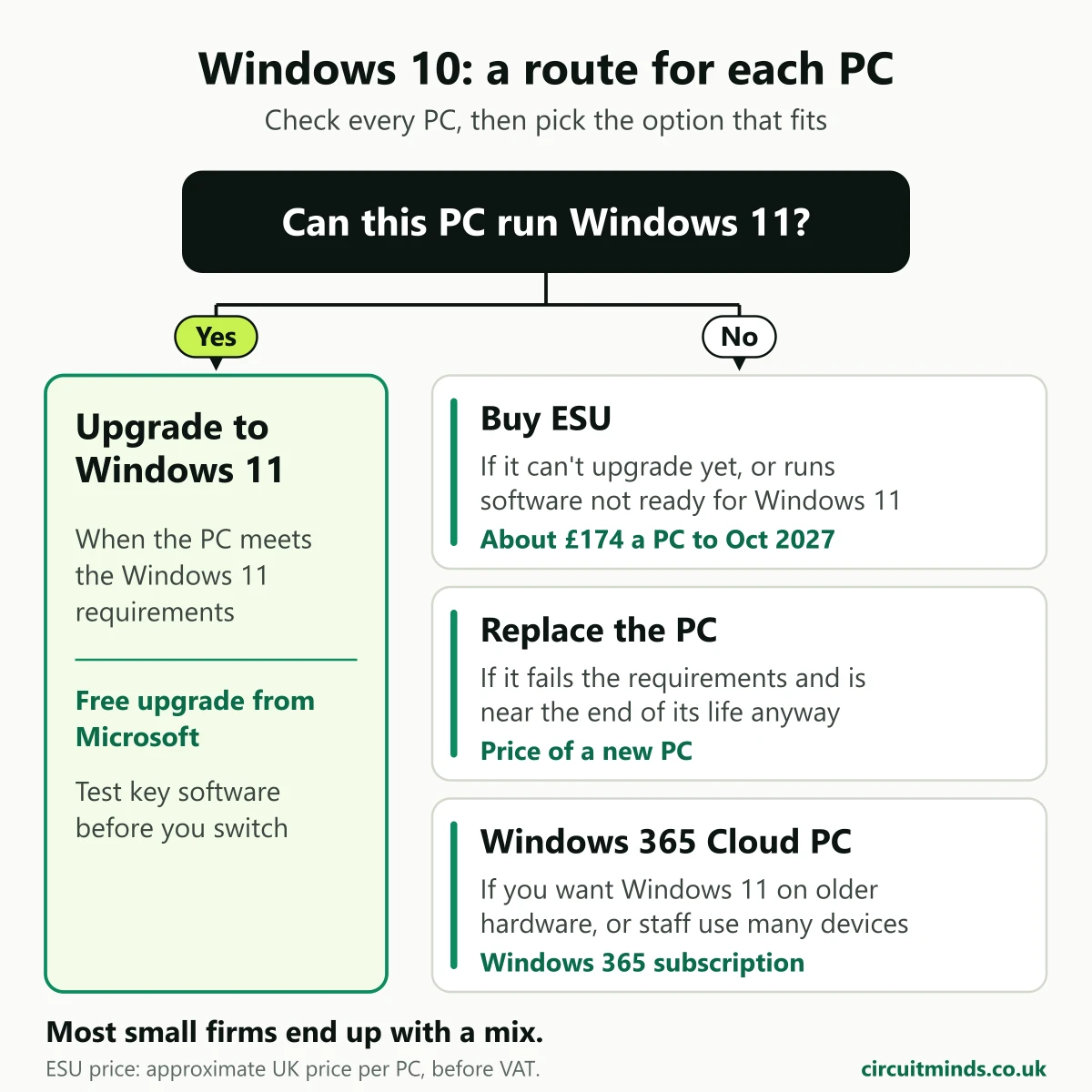
Most small firms end up with a mix: upgrade most PCs, put ESU on a handful, and replace those on a planned schedule rather than all at once.
The cloud PC route deserves a mention because of an ESU detail many people miss. Microsoft says Windows 10 PCs used to connect to Windows 365 Cloud PCs are entitled to ESU for up to three years with an active Windows 365 licence. Windows 10 virtual machines in Windows 365 and Azure Virtual Desktop also get ESU at no extra cost.
How do I check which PCs can run Windows 11?
Windows 11 needs, among other things:
- A compatible 64-bit processor with two or more cores, 1 GHz or faster
- 4 GB of memory and 64 GB of storage
- UEFI firmware with Secure Boot
- TPM 2.0 (a security chip built into most business PCs from the last several years)
On a single PC, Settings, Windows Update tells you if it's eligible. If your PCs are managed in Intune, the Work from anywhere report in Endpoint analytics shows each device as Capable or Not capable, with the reason. That report is the first thing I look at when planning an upgrade, because it turns "we think most are fine" into a list.
While you're checking your PCs, check your Microsoft 365 too. Our free security audit runs 76 read-only checks on sign-ins, admin accounts and email, and you keep the report.
How do Intune and Autopilot help with the upgrade?
With PCs managed in Microsoft Intune, the upgrade doesn't need anyone visiting desks. An Intune feature update policy offers Windows 11 to the PCs that qualify, and Microsoft notes that devices that don't meet the requirements won't install it. Staff keep their files and apps, and the upgrade runs much like a large Windows update.
For the PCs you replace, Windows Autopilot lets a new laptop set itself up the first time someone signs in, with apps and security settings applied. I've written up how Autopilot and Intune deploy laptops step by step. If you'd like help setting this up, see Microsoft Intune consultancy.
What happens if you do nothing?
The PCs keep working. Nothing switches off. What changes is quieter:
- No security fixes for new Windows 10 flaws, unless the PC has ESU.
- Cyber Essentials: the scheme requires software on in-scope devices to be "licensed and supported", and IASME says Windows 10 PCs need ESU to stay within that rule. Unsupported Windows 10 PCs would have to be removed from scope or replaced. More on Cyber Essentials for small firms.
- Microsoft 365 apps: Word, Excel and Outlook keep working and get security updates on Windows 10 until 10 October 2028. But they stop at Version 2608 with no new features, and Microsoft support will ask you to move to Windows 11 if an issue only happens on Windows 10.
- Insurers and clients increasingly ask what operating systems you run. "Some PCs are on Windows 10 with ESU, with a replacement date" is a much easier answer than "we're not sure".
Keeping on top of updates across every PC is part of managed patching.
FAQ
Is Windows 10 still safe to use? A Windows 10 PC with ESU still gets critical and important security fixes, so it's reasonably protected until its ESU year ends. Without ESU it gets no fixes for new flaws, and the risk grows each month. ESU is a bridge to Windows 11, not a reason to stay.
Can a business get Windows 10 security updates for free? Not on normal office PCs. The free consumer option excludes PCs joined to Microsoft Entra or managed with device management. The exceptions are Windows 10 PCs connecting to Windows 365 Cloud PCs, and Windows 10 machines running in Windows 365 or Azure Virtual Desktop, where ESU is included.
Is ESU priced per device or per user? Per device. Each Windows 10 PC needs its own ESU licence for each year, and the minimum purchase is one licence. Buying Year 2 means buying Year 1 too, so joining now costs about £174 per PC before VAT.
When does Windows 10 ESU end? For business PCs, Year 2 ends on 12 October 2027 and Year 3, the final year, ends on 10 October 2028. The consumer programme ends on 12 October 2027. After October 2028 there are no more Windows 10 security updates for businesses.
Do I need new PCs for Windows 11? Only for PCs that fail the hardware requirements, usually because of the processor or TPM 2.0. Eligible PCs upgrade to Windows 11 at no licence cost. Check each PC in Settings, Windows Update, or across the business with Intune's readiness report.
While you're at it, check Microsoft 365 too
Sorting out Windows 10 is a good moment to check the rest of your setup. The free Microsoft 365 security audit runs 76 checks across sign-ins, admin accounts, email and whether your devices are managed. It's free for businesses with 5 or more users, and you keep the written report whether or not we work together.
Sources: 11 Microsoft, NCSC and IASME pages, last checked 4 November 2026
- Microsoft Learn, Extended Security Updates (ESU) program for Windows 10: price, doubling, cumulative years, minimum one licence, Windows 365 and Azure Virtual Desktop inclusion. Accessed 4 November 2026.
- Microsoft Learn, Lifecycle FAQ: Extended Security Updates: "last resort", year end dates, eligible editions. Accessed 4 November 2026.
- Microsoft Learn, Purchasing Extended Security Update licenses as a CSP partner: coverage start and end dates, perpetual licences per year. Accessed 4 November 2026.
- Microsoft Learn, Enable Windows 10 ESU for physical machines: prerequisites and activation. Accessed 4 November 2026.
- Microsoft Windows IT Pro Blog, When to use Windows 10 Extended Security Updates: Windows 365 entitlement. Accessed 4 November 2026.
- Microsoft, Windows 10 Consumer Extended Security Updates: consumer options, commercial exclusion, end date 12 October 2027. Accessed 4 November 2026.
- Microsoft Learn, Windows 11 requirements. Accessed 4 November 2026.
- Microsoft Learn, Upgrade devices to Windows 11 using feature updates (Intune) and Work from anywhere report. Accessed 4 November 2026.
- Microsoft Learn, Windows 10 end of support and Microsoft 365 Apps. Accessed 4 November 2026.
- NCSC, Cyber Essentials: Requirements for IT Infrastructure v3.3 (April 2026), Security update management. Accessed 4 November 2026.
- IASME, Cyber Essentials knowledge hub: Windows 10 end of support. Accessed 4 November 2026.
Want this handled for you?
Circuit Minds is a UK managed IT provider - plans from £45 per user/month, with a free Microsoft 365 security audit to start. Cancel with 30 days notice anytime in your first 3 months, no questions asked.